

Visual Guide to Distinguishing Ants from Termites
- Written by: The Times
Distinguishing ants from termites is crucial for homeowners who wish to protect their properties from structural damage. These tiny creatures, though seemingly unthreatening, can cause significant havoc. Knowing the differences between them is vital for addressing potential issues effectively. Both ants and termites can inflict considerable damage on homes, furniture, and other wooden structures; termites are infamous for their ability to consume wood, while some ant species can weaken structures through their nesting habits. This guide aims to provide visual cues that can assist in accurate identification, saving both time and resources in pest control efforts.
Physical Differences Between Ants and Termites
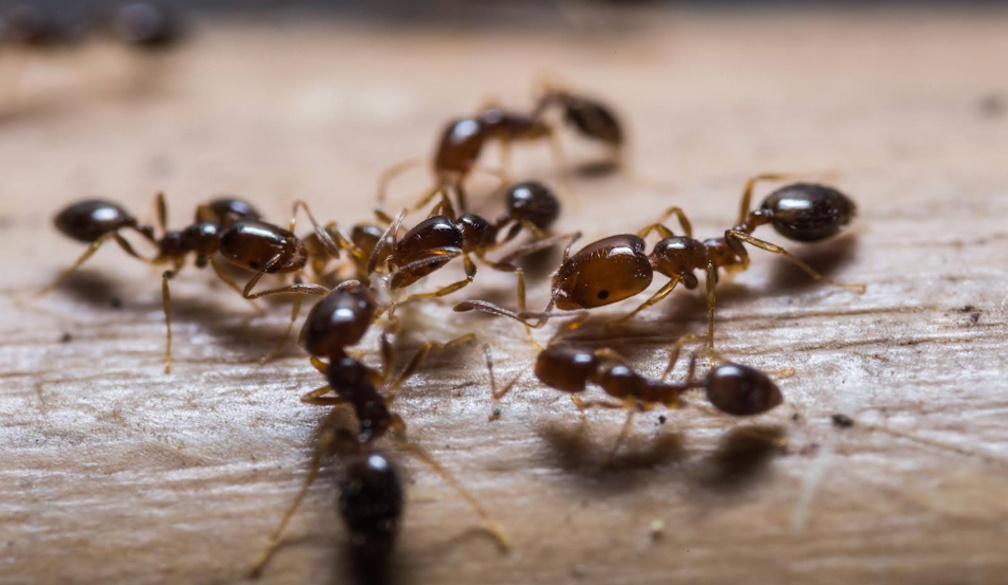
Identifying ants and termites primarily involves examining their body structures, such as waistlines, antennae, and wings. Ants typically have a slender waist, whereas termites exhibit a more uniform, broad waist. This distinction is particularly noticeable when the insects are at rest. The antennae also differ: ants have elbowed antennae, whereas termites possess straight, beaded antennae.
Wings are another tell-tale feature. While both species have two pairs of wings, termite wings are of equal length, and ants have one pair longer than the other. Paying attention to these characteristics can make the identification process much more straightforward. Regarding colouration, ants are usually darker, ranging from black to red, while termites have lighter, creamy hues.
Size can vary within species, but generally, termites tend to be slightly larger than ants. Observing movement patterns can also help; ants are known for their erratic, hurried movements, whereas termites usually move in a more deliberate manner.
Habitats and Environments
Understanding the typical habitats of ants and termites can provide valuable clues for identification. Ants are flexible creatures that can build nests both indoors and outdoors, thriving in various environments. They frequently establish colonies in walls, under floors, or in gardens.
On the other hand, termites prefer moist, dark environments, often building their nests in soil or inside wooden structures. This penchant for wood makes them particularly dangerous to homes. Seasonal changes and weather conditions can further influence their habitats. Termites thrive in humid, warm climates, while ants can adapt to a broader range of conditions.
Frequently, signs of infestation can be found in areas where moisture accumulates or wood deterioration is evident. Knowing these preferences can aid in early detection and prevention efforts.
Behaviour and Feeding Habits
A closer look at their behaviour and feeding habits reveals more about these insects. Ants are omnivores, consuming a diverse diet including sugars, proteins, and fats, hence their presence in kitchens and food storage areas. Conversely, termites feed on cellulose found in wood, paper, and other plant materials, making their impact more structural.
In the ecosystem, ants are crucial in aerating the soil and controlling pest populations. Termites, while beneficial for decomposing organic material in the wild, can become destructive when their love for wood extends to human structures.
Both insects exhibit complex social structures, living in well-organised colonies with designated roles. Ants often forage in visible trails, while termites remain hidden, making termite identification assistance essential. Recognising these habits helps homeowners understand the extent of infestations and take appropriate action.
Preventative Measures and Control
Prevention is always better than cure, especially when dealing with potential infestations. Simple home maintenance tips can go a long way in keeping these pests at bay. For instance, sealing cracks and crevices in the foundation of a home prevents ants from entering, while reducing moisture and addressing leaks can deter termites.
Natural deterrents such as peppermint oil or vinegar could repel ants, whereas borax and diatomaceous earth may combat termite infestations. For persistent infestations, chemical treatments are available, but it's crucial to use them judiciously and according to the manufacturer's guidance.
Regular inspections and professional consultations are invaluable. They not only help identify existing problems but also provide advice on keeping premises pest-free. When dealing with infestations, safety should always come first, especially if chemical interventions are employed.
When to Seek Professional Help
Knowing when to seek professional help is vital for severe infestations. Warning signs requiring expert intervention include mud tubes (a classic sign of termites), mysterious noises from walls (often indicating ant activity), or visible damage to wooden structures.
When choosing pest control services, look for reputable companies with positive reviews and certified professionals. While DIY methods might suffice for minor issues, professional treatment provides a more comprehensive solution, often preventing recurrences.
Case studies of professional interventions often highlight instances where individuals misjudged the severity of an infestation, only to find extensive damage later on. Timely professional involvement can save significant repair costs and preserve property integrity.
Conclusion
Identifying and understanding the key differences between ants and termites is essential for effective pest control. This guide serves as a resource for anyone needing to identify these insects. Early detection and appropriate measures can prevent unsightly and costly damage to homes. Having this information at hand is beneficial, ensuring awareness and preparedness in dealing with these common pests. After all, maintaining a harmonious living environment with these, albeit intrusive, creatures can lead to a more peaceful home life.