

What does the Optus data breach mean for you and how can you protect yourself? A step-by-step guide
- Written by: Jennifer J. Williams, PhD Candidate, Macquarie University
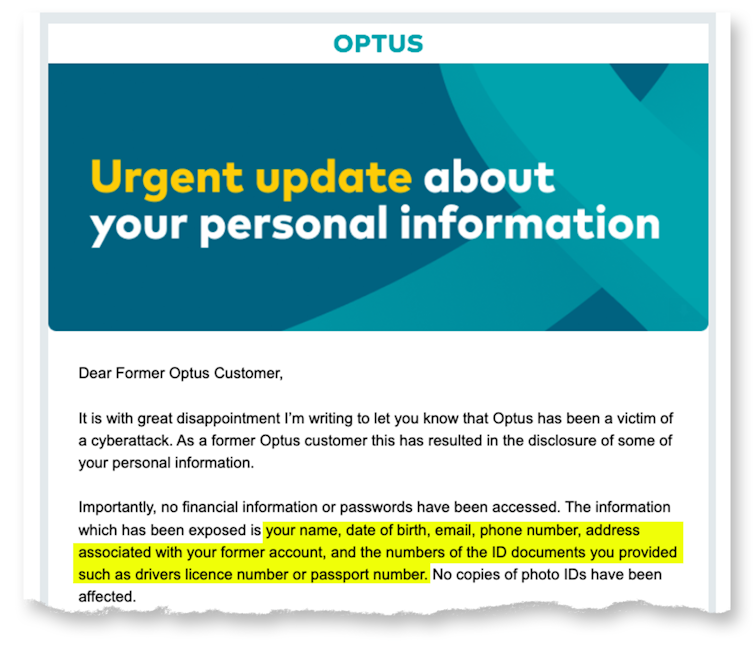
Optus, Australia’s second largest telecommunications company, announced on September 22[1] that identifying details of up to 9.8 million customers were stolen from their customer database.
The details, dating back to 2017, include names, birth dates, phone numbers, email addresses, and – for some customers – addresses and driver’s licence or passport numbers.
According to the Australian law[2], telecommunications providers are required to hold your data while you are their customer and for an additional two years, but may keep the data for longer for their own business purposes.
This means that if you are a previous customer of Optus, your data may also be involved - although it remains unclear how long the details of past customers have been held.
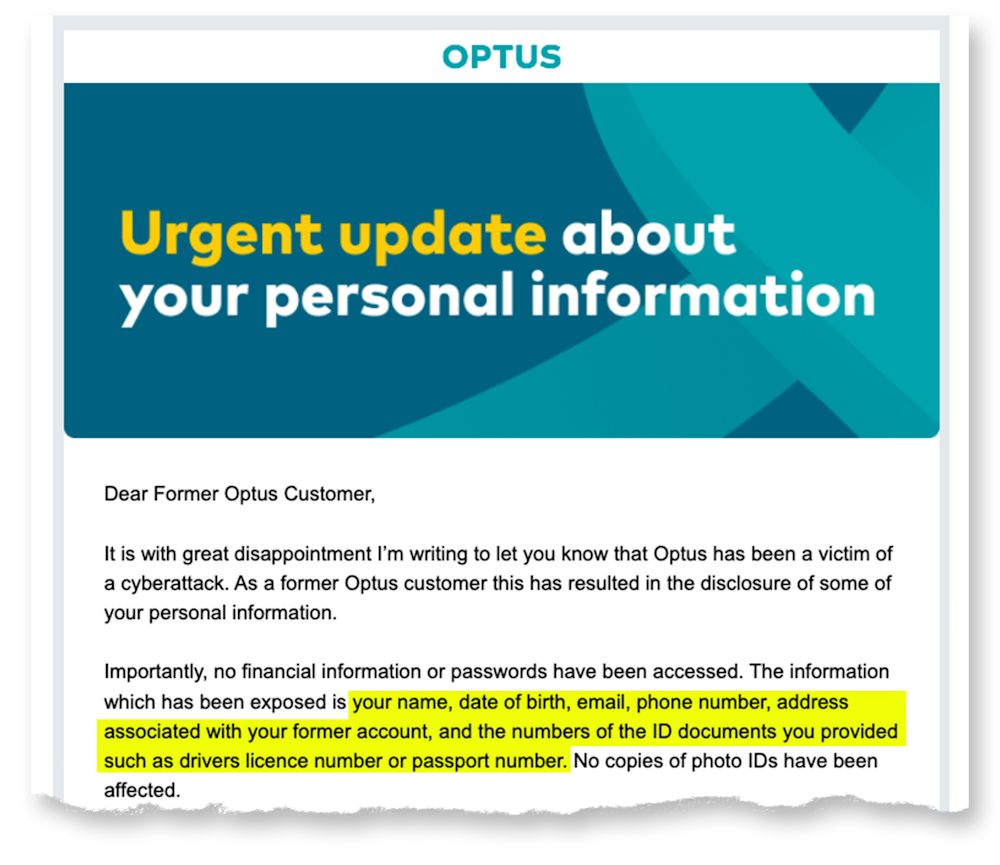
The stolen data constitutes an almost complete suite of identity information about a significant number of Australians. Optus states they have notified those affected, but there are plenty of questions remaining.
What happens with your data next, and what can the average Australian do to protect against the threats caused by this unprecedented data breach?
Read more: How not to tell customers their data is at risk: the perils of the Optus approach[3]
What will happen to the data?
Late last week, an anonymous poster on a dark web forum posted a sample of data ostensibly from the breach, with an offer not to sell the data if Optus pays a US$1 million ransom[4]. While its legitimacy has not yet been verified, it is unlikely the attackers will delete the data and move on.
More likely, the data will be distributed across the dark net (sold at first, but eventually available for free). Cyber criminals use these data to commit identity theft and fraudulent credit applications, or use the personal information to gain your trust in phishing attacks.
Below, we outline several steps you can take to proactively defend yourself, and how to detect and respond to malicious uses of your data and identity.
What should I do if I’ve been affected?
Step 1: Identify your most vulnerable accounts and secure them
Make a list of your most vulnerable accounts. What bank accounts do you hold? What about superannuation or brokerage accounts? Do you have important medical information on any services that thieves may use against you? What accounts are your credit card details saved to? Amazon and eBay are common targets as people often keep credit card details saved to those accounts.
Next, check how a password reset is done on these accounts. Does it merely require access to your text messages or email account? If so, you need to protect those accounts as well. Consider updating your password to a new – never before used – password for each account as a precaution.
Many accounts allow multi-factor authentication. This adds an extra layer for criminals to break through, for example by requesting an additional code to type in. Activate multi-factor authentication on your sensitive accounts, such as banks, superannuation and brokerage accounts.
Ideally, use an application like Google Authenticator[5] or Microsoft Authenticator[6] if the service allows, or an email that is not listed with Optus. Avoid having codes sent to your Optus phone number, as it’s at higher risk of being stolen.
Read more: There are systems 'guarding' your data in cyberspace – but who is guarding the guards?[7]
Step 2: Lock your SIM card and credit card if possible
One of the most immediate concerns will be using the leaked data to compromise your phone number, which is what many people use for their multi-factor authentication. SIM jacking[8] – getting a mobile phone provider to give access to a phone number they don’t own – will be a serious threat.
Most carriers allow you to add a verbal PIN as the second verification step, to prevent SIM jacking. While Optus has locked SIM cards temporarily, that lock is unlikely to last. Call your provider and ask for a verbal PIN to be added to your account. If you suddenly lose all mobile service in unusual circumstances, contact your provider to make sure you haven’t been SIM jacked.
To prevent identity theft, you can place a short-term freeze (or credit ban) on your credit checks. These can help stop criminals taking out credit in your name, but it makes applying for credit yourself difficult during the freeze. The three major credit report companies, Experian[9], Illion[10], and Equifax[11] offer this service.
If you can’t freeze your credit because you need access yourself, Equifax offers a paid credit alert service[12] to notify you of credit checks on your identity. If you get a suspicious credit alert, you can halt the process quickly by contacting the service that requested the report.
Step 3: Improve your cyber hygiene
These breaches don’t exist in a vacuum. The personal information stolen from Optus may be used with other information cyber criminals find about you online; social media, your employer’s website, discussion forums and previous breaches provide additional information.
Many people have unknowingly been victims of cyber breaches in the past. You should check what information about you is available to cyber criminals by checking HaveIBeenPwned[13]. HaveIBeenPwned is operated by Australian security professional Troy Hunt, who maintains a database of known leaked data.
You can search your email accounts on the site to get a list of what breaches they have been involved in. Consider what passwords those accounts used. Are you using those passwords anywhere else?
Take extra care in verifying emails and text messages. Scammers use leaked information to make phishing attempts more credible and targeted. Never click links sent via text or email. Don’t assume someone calling from a company is legitimate, get the customer support number from their website, and call them on that number.
Creating unique and secure passwords for every service is the best defence you have. It is made easier using a password manager – many free apps are available – to manage your passwords. Don’t reuse passwords across multiple services, since they can be used to access other accounts.
If you aren’t using a password manager, you should at least keep unique passwords on your most vulnerable accounts, and avoid keeping digital records of them in email or in computer files while keeping any written passwords in a safe, secure, location.
I’ve been hacked, now what?
Sometimes you can do everything right, and still become a victim of a breach, so how do you know if you’ve been hacked and what can you do about it?
If you receive phone calls, emails or letters from financial institutions regarding a loan or service you know nothing about, call the institution and clarify the situation.
You should also contact IDCare[14], a not-for-profit organisation designed to assist victims of cyber-attacks and identity theft, for further guidance. You can also report cyber crimes – including identity theft – through CyberReport[15].
Read more: How vulnerable is your personal information? 4 essential reads[16]
References
- ^ announced on September 22 (www.optus.com.au)
- ^ Australian law (www.homeaffairs.gov.au)
- ^ How not to tell customers their data is at risk: the perils of the Optus approach (theconversation.com)
- ^ with an offer not to sell the data if Optus pays a US$1 million ransom (www.theguardian.com)
- ^ Google Authenticator (support.google.com)
- ^ Microsoft Authenticator (www.microsoft.com)
- ^ There are systems 'guarding' your data in cyberspace – but who is guarding the guards? (theconversation.com)
- ^ SIM jacking (blog.mozilla.org)
- ^ Experian (www.experian.com)
- ^ Illion (www.illion.com.au)
- ^ Equifax (www.equifax.com)
- ^ paid credit alert service (www.equifax.com)
- ^ HaveIBeenPwned (HaveIBeenPwned.com)
- ^ IDCare (www.idcare.org)
- ^ CyberReport (www.cyber.gov.au)
- ^ How vulnerable is your personal information? 4 essential reads (theconversation.com)